 Poly9
Poly9When spreadsheets break. What works instead.
Can we replace Excel quoting with sales AI for custom products? Yes. Spreadsheets work until product options multiply, COM pricing needs a grade matrix, or a missing rule forces a guess. Poly9 prices from your cost recipes and matrices, returns price on request when a rule is missing instead of guessing, and sends quotes buyers approve on their phone. No Excel rebuild, no version confusion, no lost formula.
Spreadsheets are flexible and familiar, which is why 43% of configure-to-order manufacturers still quote from them (Tacton, CPQ Benchmark 2025). They break when product variants multiply, COM grade matrices need lookups across files, or the person with the right formula is out.
71% of manufacturers take a day or more to produce a quote, and 88% report losing a deal because a quote was too slow (Aleran, State of Manufacturing Sales 2025). The bottleneck is finding the right version, copying the formula, and guessing when a rule is missing.
Keep spreadsheets for one-off estimates and internal cost tracking. Choose Poly9 when buyers ask for custom products with options, COM pricing or variants, and the quote must be certified and traceable.
The five verbs, plus four that decide it.
Rows the other category wins stay in. Swipe the table on a phone.
| What matters | spreadsheet quoting | Poly9 |
|---|---|---|
| Answer | No answers. The spreadsheet waits for inputs from a rep or estimator. | Answers the buyer in plain language on your site, at the booth or in the showroom. |
| Configure | Lists options in columns. No compatibility enforcement; the user checks by hand. | Enforces your compatibility rules and refuses invalid configurations with a reason. |
| Price | Formula per row. A missing rule produces an error or forces a guess. | Prices from cost recipes and grade matrices. Missing rule returns price on request. |
| Quote | Rebuilt every time: fix formatting, copy last version, export to PDF, email the file. | No rebuild. The quote lands in Projects; you press send; buyer approves on their phone. |
| Present | Paste a photo or describe it in text. No render, no labeled options. | Renders the product in chosen materials from your library, labeled as a render. |
| FlexibilityThey win this row | Any formula, any layout. Change it on the fly for one-off estimates. | Rules are centralized and applied the same way every time. One-offs go through recipes. |
| Learns your business | Static. Every quote starts from the last one you saved and copied. | Learns which options sell together, which buyers prefer which grades, which rules are missing. |
| Pricing model | Included with Microsoft 365 or other office software. | Monthly plans from $99 with AI credits; everyone on the team included. |
| Time to first quote | Instant if the right version exists. Hours or days if you start from scratch or wait on the estimator. | Same day with a sample catalog. Certified quotes once your first pricing rule is written. |
Category behavior is described in general terms; specific products vary. Poly9 behavior is as shipped in September 2026.
The five steps. Price comes from approved rules, or returns price on request.
Why the differences matter.
A spreadsheet does not answer questions; it holds numbers. Poly9 answers the buyer in plain language on your website, in the showroom or at the booth. The buyer asks “walnut frame, COM grade F, king” and gets a certified quote from your rules before they leave the page. Spreadsheets require a rep to open the file, find the right tab, key in the options and send the output.
Spreadsheets list options in columns. Whether walnut works with the upholstered base or requires a wood frame is a note in someone’s head or a second tab. Poly9 enforces the constraint in the cost recipe: "walnut leg requires wood frame base". The buyer asks for the invalid combination, the AI refuses it with the reason, and no wrong quote goes out.
This is the line that costs orders. A spreadsheet formula breaks when the input is missing, and the person filling it guesses or waits. Poly9 prices from cost recipes and grade matrices, and when a rule is missing it returns price on request and drafts the internal request for your estimator. It never estimates. For custom products where a wrong number loses the deal, that is the difference.
Every Excel quote is a rebuild. Find last month’s file, copy it, update the options, fix the formula someone changed, adjust the layout, export to PDF, email the attachment. Poly9 sends the quote from the conversation: the buyer opens it on their phone, sees the product in the chosen options, approves in one tap, and the order is created from the approval. No file, no rebuild, no versioning.
A spreadsheet cannot render. You paste a photo or describe it in words. Poly9 renders your product in the materials the buyer chose from your materials library, labels it as a render, and prices a collection from a mood board. For custom products where the visual sells before the number does, that closes the sale.
Flexibility is the spreadsheet’s strength, and where it fails at scale. Any user can change any formula for any reason, and the change is invisible until the next person opens that version. Poly9 stores rules as cost recipes in one place, applies them the same way every time, and logs every price to its source. One-off adjustments go through the same recipe engine with a note.
A spreadsheet is frozen at the moment you saved it. Poly9 learns from every quote: which options this buyer prefers, which rules are missing, which configurations sell together. The cost recipes are still yours and enforced. The memory layer shows you what to price next.
Spreadsheets come with your Microsoft subscription or other office software. Poly9 is a monthly plan with AI credits. Four reps sending 30 quotes a week use about 520 credits a month, which fits the Factory plan at $299. Everyone on your team is included.
A spreadsheet is instant if the right version exists and the person who built it is available. Poly9 is an account: create it, add your catalog or start with your industry’s sample catalog, write the first cost recipe, and send the first certified quote in the same session. A 37,400-SKU fabric line with COM grade matrices loaded in one day once the files were in hand.
- One-off estimates where the formula is simpler to write in a cell than a recipe.
- Internal cost tracking that never becomes a buyer-facing quote.
- Ad-hoc scenario modeling: what if material costs rise 8% next quarter?
- A business with fixed-price SKUs looked up from a list, not configured from options.
- Anything where the output is for your eyes only and traceability does not matter.
- Buyers ask for custom products with options, COM or variants on your site or at your booth.
- The quote must be certified and every line traceable to its cost rule.
- You rebuild quotes in Excel after pulling them from another tool or an RFQ.
- Missing pricing rules currently force guesses, and a wrong number costs the order.
- Multiple people quote and the formulas drift, or the right version lives in one person’s files.
- The buyer should approve the quote on their phone without downloading a spreadsheet.
Most manufacturers keep spreadsheets for internal estimates and scenario modeling and use Poly9 for buyer-facing quotes. The sales team quotes from Poly9 with certified pricing and traceable rules. The estimating team models costs, minimums and lead times in Excel and migrates the results into cost recipes once the scenario is settled.
Ask for an option you have not priced.
Whatever you compare it with, run this on your own catalog. Poly9 prices from your recipes and matrices through one engine, and when the rule is missing it says “price on request” and drafts the request. The tool that produces a plausible number instead is the one that costs you an order.
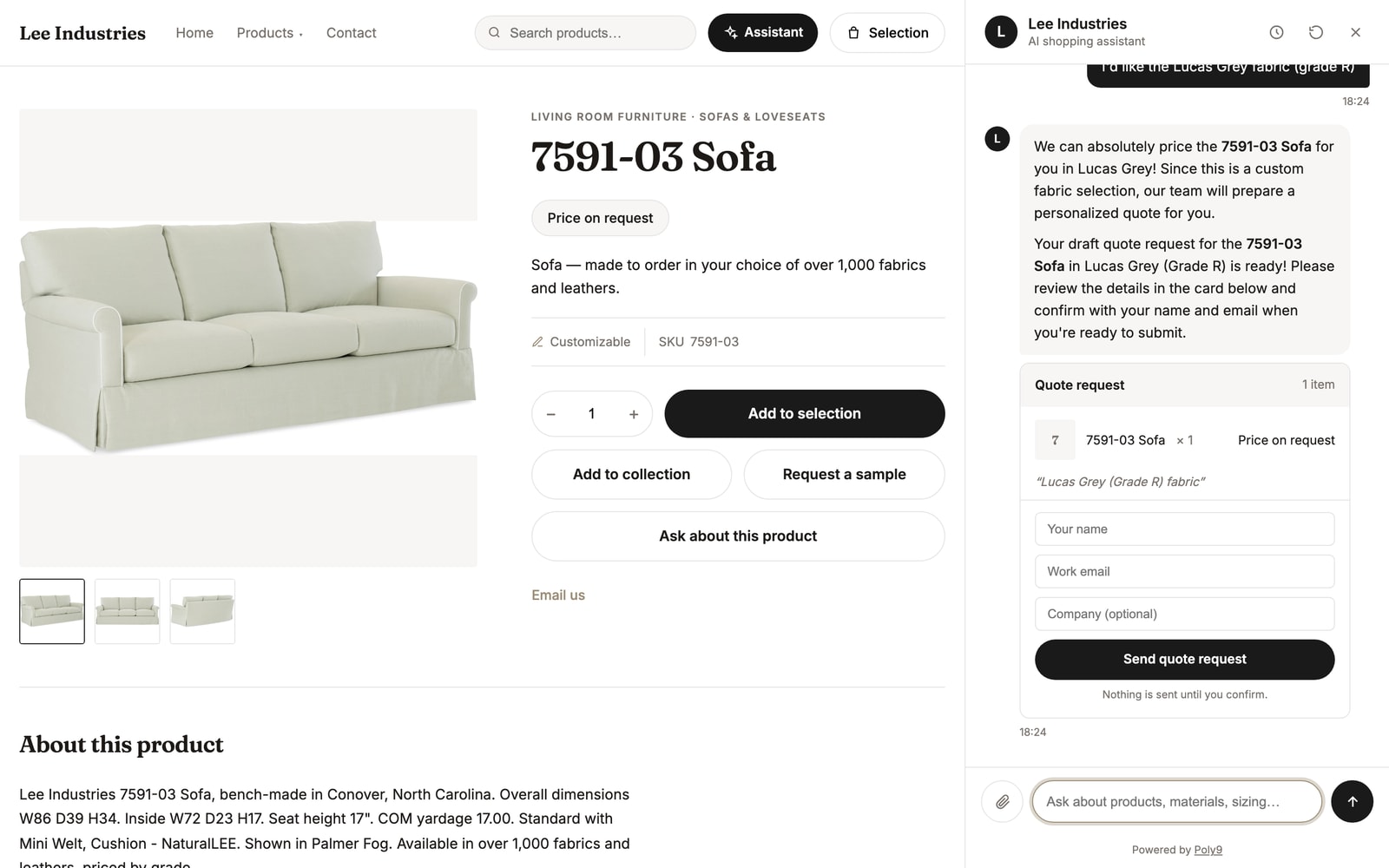
COM fabric, no matrix entry: price on request with a drafted internal request. Real storefront.
Questions about spreadsheet quoting.
Why do spreadsheets fail for custom product quoting?
Can Poly9 import our existing Excel pricing sheets?
What happens to the formulas we already wrote?
Do we lose the flexibility of a spreadsheet?
Can multiple people quote without version confusion?
What does “price on request” mean and why does it matter?
How fast can we stop rebuilding quotes in Excel?
Can buyers approve quotes without downloading a file?
- Tacton, CPQ Benchmark 2025: 43% of configure-to-order companies still quote from spreadsheets
- Aleran, State of Manufacturing Sales 2025: 71% take a day or more per quote; 88% have lost a deal to a slow quote
- Poly9 plan catalog, September 2026
Get started. Judge it on your own catalog.
Create your account, add your catalog or start with your industry’s sample catalog, and ask the question you would ask the other tool. Plans are paid monthly and cancel any time.